Loading

Adjust the volume and EQ setting of podcast and audiobooks automatically

Continuing with my previous post 1 , 2 ….
I wrote a little script that I run every day via Windows Scheduled tasks. The script adjust the volume and EQ setting of all the podcasts and audiobooks everyday to update the just downloaded podcast. I find hard to listen to podcast and audiobook at the gym (that’s were I hear the podcast/audiobok) at the standard volume so I like to adjust the volume +100% and change the EQ setting to “Spoken word”.

Save the file adjustvolume.js and make sure that file extension is handled by wscript.exe. The file association windows should look like this
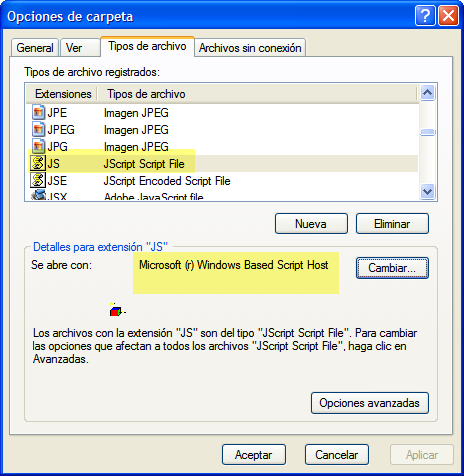
Folder options for .js (JScript) files

Now in Control Panel -> Scheduled Tasks you can set that script to execute every day to maintain your podcasts and audiobook with the correct settings

One Trackback

  1. [...] That should be all. You now have your iTunes alarm clock! You can, of course, do lots of other stuff. For example – if you have a program that translates any hot key to a command, you can make scripts for going to next and previous track, play/pause and similar. To get some good ideas, check this Microsoft article out. There is also some info here and here. Finally, do you have an idea for a script that none of these articles seem to describe? Download the Apple SDK, open the zip file and then open the iTunesCOMInterface.h file. Don’t be scared by all the C code – just search through it (for example, you want to activate Repeat, search for “repeat”). The name of the methods in the C code are most of the time identical to, or similar to, the commands you need to write in your script. Good luck! Tags:apple, code, howto, iTunes, programming, script, Technology windowsShare This [ ] [ January 17, 2007 ] [ Technology ] [ ] [...]

Post a Comment

Your email is never shared.