Loading

bash: clear: command not found

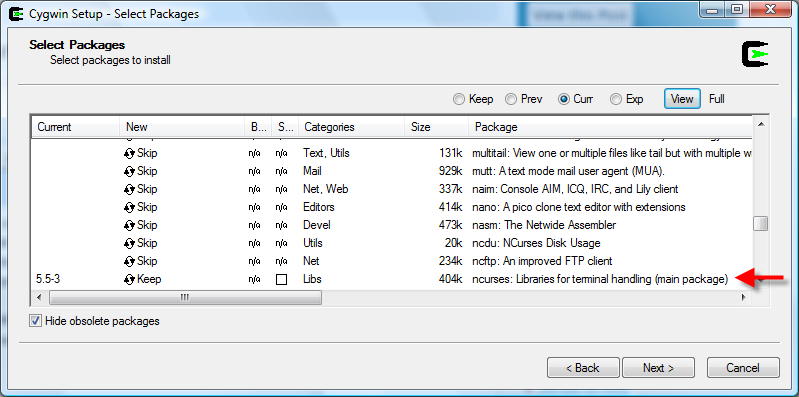
If your are getting “bash: clear: command not found” on you first install of cygwin you have to make sure that you include ncurses packages in your cygwin installation. clear.exe doesn´t come in the standard installation. You must include ncurses to get clear.exe in your system. If you are using bash you can use Ctrl-L and get the same result though.

UPDATE: ncurses is a cygwin package in libs category in Utils category. You can install it using the the Cygwin Setup utility (just run setup.exe again). See screenshot below
35 Comments

  1. Michael
    Posted November 3, 2007 at 3:37 am | Permalink

    Thanks Ruben. You saved me a heck of a long search for clear.exe. Is this new (clear not being in the “base”)? I’ve probably installed cygwin a donen times in the past few years and haven’t had this problem until now.

  2. Posted November 3, 2007 at 6:58 am | Permalink

    ‘m not sure but I also think this behaviour is new. I was also surprised the first time I saw this. I reinstalled cygwin several times until I realized that there was nothing wrong with my installation and that ncurses was the package that I was missing.

  3. Posted February 27, 2008 at 1:24 pm | Permalink

    Thanks. Found your post from google, help me
    “fix” my cygwin installation.

  4. Posted March 19, 2008 at 1:59 pm | Permalink

    Thanks. Thought I was going crazy not having the clear after a new cygwin install.

  5. Posted June 12, 2008 at 8:13 pm | Permalink

    Hmm… What is ncurses and where do I get it? Further, how do I type Ctrl-L in bash. I keep getting an error.

    Thanks…

  6. Dave
    Posted June 28, 2008 at 3:22 am | Permalink

    Thanks so much. This is definitely something new with cygwin installation. I’ve always took clear for granted until I realized it isn’t included by default anymore. I had to copy clear.exe from an old installation just to get it to work, and I always thought I’ve corrupted the installation somehow.

    erik: ncurses contains libraries for terminal handling and you get it by running cygwin’s setup.exe again and add it to your installation. You should be able to type Ctrl-L (hold down control key + press L) in your cygwin terminal window.

  7. Ismael Goulart
    Posted July 8, 2008 at 2:10 am | Permalink

    Thanks so much.

  8. Perry Jones
    Posted July 29, 2008 at 2:00 am | Permalink

    Fantastic! Thanks for the info.

    Btw, if you’re looking at the packages in category view (the default view in the setup program), ncurses is in the “Libs” section.

  9. Nycil
    Posted August 14, 2008 at 5:22 pm | Permalink

    thank you..

  10. Ronald Bulbow
    Posted September 6, 2008 at 5:20 am | Permalink

    I remember that when I installed cygwin in the past, there was a ‘clear.exe’ in the bin directory.
    Anyway, the ncurses package solved the problem.
    Thanks a lot Ruben!

  11. Posted September 26, 2008 at 3:49 am | Permalink

    Thanks a lot. You spared me a drunken rage or two :)

  12. Chris
    Posted October 20, 2008 at 10:57 pm | Permalink

    thanks!

  13. Ibn
    Posted November 4, 2008 at 2:27 pm | Permalink

    Thanks.

    This post was the first post I found on this issue, and then I spent a few more seconds googling for which categroy I could find the ncurses package in.

    It was in the libs category, but for ease, i’d appreciate if you could update the original post.

  14. sheetal
    Posted November 10, 2008 at 6:53 pm | Permalink

    Thanks!

  15. kapil
    Posted November 13, 2008 at 1:20 am | Permalink

    Thanks! Saved me a lot of frustration and time..

  16. Rajkumar
    Posted November 20, 2008 at 9:38 am | Permalink

    Thanks a lot ….

  17. Rahul
    Posted January 2, 2009 at 7:26 am | Permalink

    thanks a lot.

  18. Gregg
    Posted February 3, 2009 at 6:06 am | Permalink

    this did it, thanks a bundle

  19. Daa
    Posted February 18, 2009 at 8:09 pm | Permalink

    Definitely helped a lot… Thanks a bunch..

  20. Sagar Hatekr
    Posted February 18, 2009 at 11:16 pm | Permalink

    Thanks a lot…was finding it really tough to figure out why it ain’t workin!

  21. Anon
    Posted March 27, 2009 at 4:34 pm | Permalink

    Tput.exe is part of curses library too.

  22. Mike B
    Posted April 6, 2009 at 2:56 pm | Permalink

    FYI – It looks like the ncurses package has been moved to the “Utils” section of the cygwin installer. At least that’s where I found it this morning.

  23. Bob
    Posted April 8, 2009 at 2:31 pm | Permalink

    Thank you SO MUCH for posting this – it saved me tons of frustration.

  24. Julio Cesar Carrillo-Escobar
    Posted April 10, 2009 at 2:58 pm | Permalink

    Ruben,

    I was getting crazy with this problem. Your post is great!

    Thanks a lot

  25. Anonymous
    Posted April 15, 2009 at 6:57 am | Permalink

    Installed and uninstalled then reinstalled still doesnt work. not even “Ctrl+L” on the reinstall i installed the whole thing.

  26. Posted May 30, 2009 at 4:27 pm | Permalink

    thanks dude, this error occurs when trying using cake’s bake console, thanks

  27. Maggie
    Posted July 31, 2009 at 3:45 pm | Permalink

    Thanks so much for sharing the information.

    I haven’t used Cygwin or Linux for a while. When I found “clear” command was refused by bash, I thought I remembered the command wrong. Had to google first to make sure there’s indeed such a command then google again to find out it’s missing in the cygwin default package. I wonder why it’s not included in the default package. Same with “script” command.

  28. thxmate
    Posted August 6, 2009 at 5:23 am | Permalink

    Many thanks for your answer. I love google.

  29. Harish
    Posted August 26, 2009 at 5:29 am | Permalink

    Guys, Thanks a lot !

  30. Posted September 25, 2009 at 9:01 am | Permalink

    I was trying hard to write scripts and other work around to solve this issue. Thanks for sharing this info. Internet always “HELP”

  31. Posted October 4, 2009 at 12:04 am | Permalink

    just starting to setup ssh server for cygwin.after login,i can’t run clear command, until i found this link. this is what i call, the power of internet.thanx :D

  32. maranatha
    Posted October 4, 2009 at 2:34 pm | Permalink

    It was of great help, really!
    Thanks!

  33. Posted December 14, 2009 at 10:13 pm | Permalink

    Thank You! You saved my time. Don’t understand why people want to mess-up something that is working for very long time.

    Ctl-L instead of clear by default, can’t understand the logic.

  34. Anonymous
    Posted December 25, 2009 at 6:49 pm | Permalink

    Thank you! I was hoping there would be a fix for ‘clear’ not working in Cygwin. This was it!

  35. Martin
    Posted January 8, 2010 at 1:30 pm | Permalink

    Thanks for the info :) keep up the good work!

One Trackback

  1. [...] is part of the ncurses package that may be found in the Libs category. Thanks to Ruben Laguna for his post on the [...]

Post a Comment

Your email is never shared.