Loading

cygwin: setup.exe crashes when upgrading packages

I´ve run into a very strange problem.

Every time I run setup.exe and try to upgrade bash package
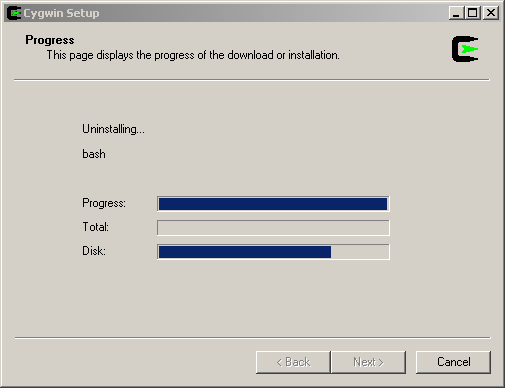
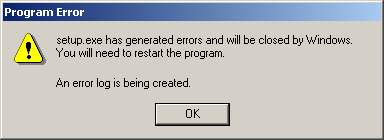
setup.exe crashes with the familiar “setup.exe has generated errors and will be close by windows. you will need to restart the program. An error log is being created”. The solution I found is for bash package but I guess it also work for other packages as well
After googling a bit I found the this mail thread . But there was no solution posted into the thread so I tried to contact the Mario Frasca (one of the participants in the mail thread) to see if he found any solution to the problem. Well, he did. He sent me a mail telling me that William Crosmun resolved his problem.

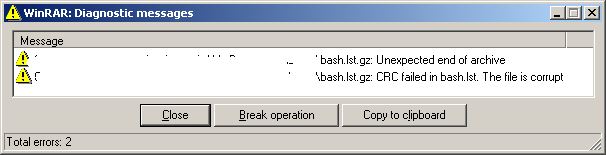
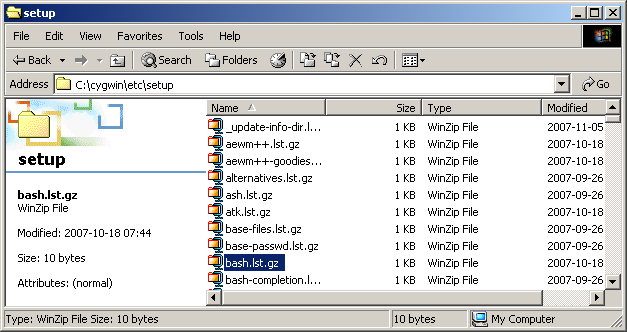
It seems that /etc/setup/bash.lst.gz became corrupted

and if you delete it

and retry the upgrade now everything should work.


UPDATE: Please make a backup of the file before deleting it. If deleting the file solve the issue then please fill a bug report at cygwin and include that file. Or post a comment here and I will try to take care of it.

Hope it helps. Remember that if your setup.exe crashes while upgrading a package other than bash you should try to delete otherpackage.lst.gz instead of bash.lst.gz.

EDIT: to find the offending package you can use for i in $(ls /etc/setup/*.gz); do gunzip -t $i; done as stated in the comments.

29 Comments

  1. Anonymous
    Posted May 25, 2008 at 10:43 am | Permalink

    Works for me ! Thanks a lot.

  2. Anonymous
    Posted May 28, 2008 at 10:23 am | Permalink

    Worked for me also. Thanks for bothering to write something up about this, it saved me reinstalling Cygwin from scratch…

    Cheers !

  3. Jacques-Olivier Goussard
    Posted June 9, 2008 at 5:51 pm | Permalink

    Man, I can’t express enough my gratitude ! Next step would be to open a bug against it with a corrupted bash.lst.gz attached – deleted mine too fast :)

  4. Posted June 18, 2008 at 12:18 pm | Permalink

    Thanks so much – this has been bugging me for a a while and all I had to do was rm a file!

  5. Jason Fritz
    Posted July 23, 2008 at 1:18 am | Permalink

    Awesome, thanks! I had this problem when cygwin setup was trying to uninstall “cygwin”. I renamed /etc/setup/cygwin.lst.gz to backup-cygwin.lst.gz and retried, and everything was fine.

    You also saved me from a total reinstall of cygwin!

  6. Andreas
    Posted August 2, 2008 at 12:39 pm | Permalink

    Thanks a a lot! Worked with my cygwin update, too.
    In my case the file cygwin.lst.gz was corrupt.

  7. Todd
    Posted August 20, 2008 at 1:27 pm | Permalink

    Thanks loads, works like a charm!

    My problem was GConf.list.gz

    Wow, look at the timestamps of these posts! Looks like there is a bug in the setup program corrupting files.

    Thanks again, a rebuild would have cut into my already overloaded work shedule.

  8. gabe
    Posted September 23, 2008 at 7:34 pm | Permalink

    i am getting an error when i try to delete this file saying:
    cannot delete bash.lst it is being used by another person or program.
    close any programs that might be using the file and try again.

    i have closed everything and i still get this error. removing this file is stopping me from removing cygwin altogether, which i need to do because the setup won’t finish just like in the example. please help!!!

  9. Posted September 24, 2008 at 6:19 am | Permalink

    Use Unlocker http://ccollomb.free.fr/unlocker/ to find which process is using the file

  10. Lou
    Posted October 9, 2008 at 8:28 pm | Permalink

    Thanks a lot – this worked for me.

  11. Anonymous
    Posted November 26, 2008 at 5:26 am | Permalink

    Same thing here. I used the following command from bash shell to find the offending files:

    for i in /etc/setup/*.gz
    do gunzip -t $i
    done

    The output should list the broken setup file (which needs to be moved/deleted).

  12. arosct
    Posted December 8, 2008 at 4:10 pm | Permalink

    It worked fine for me to.
    Many THX!

  13. Anonymous
    Posted December 12, 2008 at 7:29 pm | Permalink

    Thanks. You saved my life. :)

  14. Posted December 31, 2008 at 2:28 pm | Permalink

    Thank you very much. It worked for me too.

  15. spearbearer
    Posted January 23, 2009 at 11:28 pm | Permalink

    Thank you so much for taking time to type this up! You saved me from reinstalling Cygwin!

  16. tjr
    Posted February 13, 2009 at 12:52 am | Permalink

    Thank god for this page.

  17. Anonymous
    Posted February 13, 2009 at 7:46 pm | Permalink

    Rubin, thank you

  18. al.dexter
    Posted March 10, 2009 at 3:58 pm | Permalink

    Thanks, it works!

  19. Anonymous
    Posted April 14, 2009 at 6:15 pm | Permalink

    I was trying to upgrade a bunch of packages, and it seems just deleting that one file (bash.lst.gz) solved the problem.

    Thanks so much!

  20. Ruediger
    Posted April 28, 2009 at 7:13 pm | Permalink

    Another big “thank you” from over here. Now setup is running like a charm. I tried to update cygwin without success for a couple of weeks now.

  21. dale
    Posted May 16, 2009 at 1:16 pm | Permalink

    solved my cygwin setup.exe crash on bash upgrade as well, thanks!

  22. alan
    Posted May 20, 2009 at 2:30 pm | Permalink

    yr a legend mate. this just saved me a lot of pissing about.

  23. Posted June 3, 2009 at 9:08 pm | Permalink

    Thank you. What a frustrating issue but your blog post helped tremendously!

  24. Frank
    Posted June 19, 2009 at 8:30 am | Permalink

    Deleting the bash.lst.gz file solved my setup problem too. Thanks.

  25. andrew
    Posted July 31, 2009 at 2:15 pm | Permalink

    Thanks to you and Google, I fixed this problem in < 5 minutes. Yay Internet!

  26. Steve
    Posted August 18, 2009 at 10:28 am | Permalink

    Thanks to you and Anonymous (Posted November 26, 2008 at 5:26 am) for the tip and for a way to find damaged setup files:
    for i in $(ls /etc/setup/*.gz); do gunzip -t $i; done

  27. sux
    Posted September 10, 2009 at 2:38 pm | Permalink

    I just wasted a whole working day on this crap. I thought MS sux! This is a reason why professionals in industry shy away from Open Source and Linux. We just don’t have the time to mess around with Kinderkrankheiten like this. It’s better to pay 5k to some vendor if his software works with a few clicks, than waste a week on this type of crap and then blow 10k in lost earnings. Plus OS software is usually hard to work with. This must be my 6th time I tried moving from Windows to linux. Yet another failure. I guess there is a reason other than dirty trix why Windows is dominant.

  28. Posted January 10, 2010 at 2:13 am | Permalink

    I feel bad that I didn’t post the solution to the mail thread in the first place, but I couldn’t figure out how. That’s why I sent it to Mario Frasca personally. Thanks, Ruben, for posting it so everyone could find it. I’m sorry to see that so many were affected, but I’m glad it helped.

    Now, if anyone is having trouble getting apache to run in cygwin 1.7, I’ve gotten past that one as well (rename cygwin1.dll in your cygwin 1.5 tree. Seems the 1.7 cygserver is finding the wrong dll when it tries to start). Maybe someone can tell me how to post that solution so that others can find it…

  29. Posted January 14, 2010 at 7:42 pm | Permalink

    You can always send these things directly to the cygwin mailing list. Once you post a solution to the mailing list it’s available for everybody.

One Trackback

  1. [...] Ruben, who provided the clues, I discovered that a corrupt/incompatible alternatives.lst.bz file in the [...]

Post a Comment

Your email is never shared.