I talked about the DS1620 in a previous post. Now I created a DS1620 library for Arduino that has a more object oriented interface. The library has to be unpacked in the $arduino_home/hardware/libraries directory. After unzipping the library you should end up with a $ARDUINO_HOME/hardware/libraries/ds1620 directory.
The library contains an example that can be accessed through the File ⇒ Sketchbook ⇒ Examples ⇒ Library-ds1620 ⇒ ds1620.
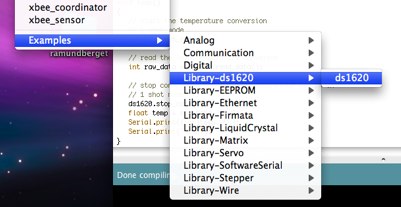
The example looks like this:
/* ds1620 example */ #define ledPin 13 #include <stdlib.h> #include <math.h> //#include <Stdio.h> #include "ds1620.h" // set up ds1620 // this sets the pins as outputs Ds1620 ds1620 = Ds1620(7/*rst*/,8/*clk*/,9/*dq*/); void setup() { // configure ds1620 // this does sets cpu mode 1shot // see datasheet http://pdfserv.maxim-ic.com/en/ds/DS1620.pd ds1620.config(); Serial.begin(9600); delay(100); Serial.print("RST\r\n"); } void loop() { // start the temperature conversion // 1 shot mode ds1620.start_conv(); // read the last temperature converson int raw_data = ds1620.read_data(); // stop conversion not really needed since we are in // 1 shot mode ds1620.stop_conv(); float temp = raw_data / 2.0; Serial.print((int)temp,DEC); Serial.print("\r\n"); }
References.


8 Comments
Excellent! Although, with the library, I’m getting a 0 return every other temp read. Not sure why yet, still tracking it down. Also, the stop_conversion method has an incorrect comment.
Try to use delay(500) after the start_conv to see if it makes any difference. I just tried the example sketch file and it works for me, every single reading is fine 20degrees. Check the wiring, use another ds1620, Let me know if you manage to fix it. I’ll correct the comment in the ds1620.cpp
Thanks for the library, I’ve found it most useful.
Perhaps a silly question, but why the need to divide the raw input by 2.0 to get the temp?
As noted in the DS1620 datasheet ” Note that temperature is represented in the DS1620 in terms of a ½°C LSB, yielding the 9–bit format”. So if you want to convert to 1°C instead on ½°C you need to divide by 2.0
Thanks for the library and the example code, it works great for me. I am making a data logging differential controller and I have a few of these 1620’s. I was wondering about how to get multiple sensors read and I suspect the answer is to share the clock and reset line but each device would have its own data pin. What is your opinion on this?
I guess that I would also start by sharing the RST and CLK lines. Not sure about the fan-out of Arduino pins, though. But my guess is that each arduino pin will be able to drive several DS1620s.
You can also use a multiplexer or I/O port expander
Hello Ruben. Great code. What happens when the temp drops below 0 Celcius? I guess there has to be some inverting to get the negative temperature eg:Ctemp = ^raw_data+1. If you have done this then maybe you can mention the additional code needed for reading below 0 degrees.
Thanks
Phillip
I didn’t test this at below 0 temperatures. It certainly won’t work properly
-0.5C will be read as 511/2.0 = 205.5C
-25C will be read as 462/2.0 = 231.0C
-50C will be read as 402/2.0 = 201.0C
I will take a look and see if I can fix the library to support negative temperatures. But I can’t really test it right now
One Trackback
[...] Ruben’s blog Just another WordPress weblog Skip to content Better JMeter GraphsEnhanced JDBC Sampler for Apache JMeter 2.2 « Example of XBee API frames DS1620 temperature sensor library for Arduino » [...]